Citrix XenDesktop 7.1 Technical Preview

Hi all

Citrix have released Citrix XenDesktop 7.1 technical preview which also includes the long waited “Citrix Virtual GPU” vGPU from NVIDIA/Citrix.

NVIDIA GRID vGPU is the industry’s most advanced technology for sharing true GPU hardware acceleration between multiple virtual desktops without compromising the graphics experience. With NVIDIA GRID vGPU you can configure GPU sharing for up to 8 users per physical GPU. The technology only works with GRID GPU’s from NVIDIA.

Upgrading XenDesktop is not supported, including:

  • XenDesktop 7 to this XenDesktop Technology Preview.
  • XenDesktop versions earlier than XenDesktop 7 to this XenDesktop Technology
  • This XenDesktop Technology Preview to the final XenDesktop release.

current limitations with vGPU

  • vGPU is only available using XenServer (not available with other hypervisors).
  • vGPU using Windows 8 and Windows 8.1 is not supported.

What’s new in XenDesktop 7.1 Technology Preview

  • vGPU
    The Graphical Processing Unit (GPU) capabilities feature provides graphics virtualization, offering a superior experience for users who use graphic-intensive applications and often manipulate 3-D models. The GPU feature also can improve the graphics experience for a large number of users. Administrators can evaluate workflows for the creation of GPU-capable connections and machine catalogs created with an MCS-provisioned master image. If problems are encountered, then Administrators may need to manually create the machines.
  • Windows Server 2012 R2 and Windows 8.1 support
    Deliver a high-definition user experience on Windows 8.1 virtual desktops and physical machines. HDX 3D Pro has also been upgraded to support Windows 8.1.

Source

Download Citrix XenDesktop 7 TP here (Requires MyCitrix account)

Download Citrix Virtual GPU Solution technical preview here

Reviewer’s Guides for HDX 3D Pro Graphics, on both XenServer and vSphere

Hi All

A good friend of mine from Citrix, Mayunk Jain & Pushpal have created these reviewers guide for Citrix XenDesktop 7 HDX 3D Pro.

The guides will help you how to either configure GPU pass-through on XenServer or VMware vSphere with Citrix XenDesktop 7 HDX 3D Pro.

He is using following hardware: Dell R720 with NVIDIA GRID K1 and K2, just like I have been using in many of the articles and videos I have shared to the community, and solutions I have build at customers.

In the first guide, they cover physical installation of GPU cards in a server, and how to enable GPU pass-through in XenServer 6.2. High-end graphics apps running on Windows Server VMs can share GPU among multiple user-sessions when delivered using XenDesktop 7 Apps or XenApp 6.5 FP2.

In part two, they see a similar use case on VMware vSphere platform. It describes the steps to enable GPU pass-through feature in vSphere 5.1, called virtual Dedicated Graphics Acceleration (vDGA). You learn how to set up XenDesktop 7 Apps and access 3D graphics using Citrix Receiver.

Part three walks through the steps to deliver virtualized access to a class of high performance graphics-intensive applications, which haven’t previously been considered virtualization friendly. Known as the vGPU feature in XenServer, this will be released as a tech preview later this month.

Part four looks at a different use-case on VMware vSphere, where the GPU is shared between several desktop VMs using software emulation. Called virtual Shared Graphics Acceleration (vSGA), this feature allows desktops published in XenDesktop 7 to deliver hardware-accelerated graphics apps on a vSphere platform.

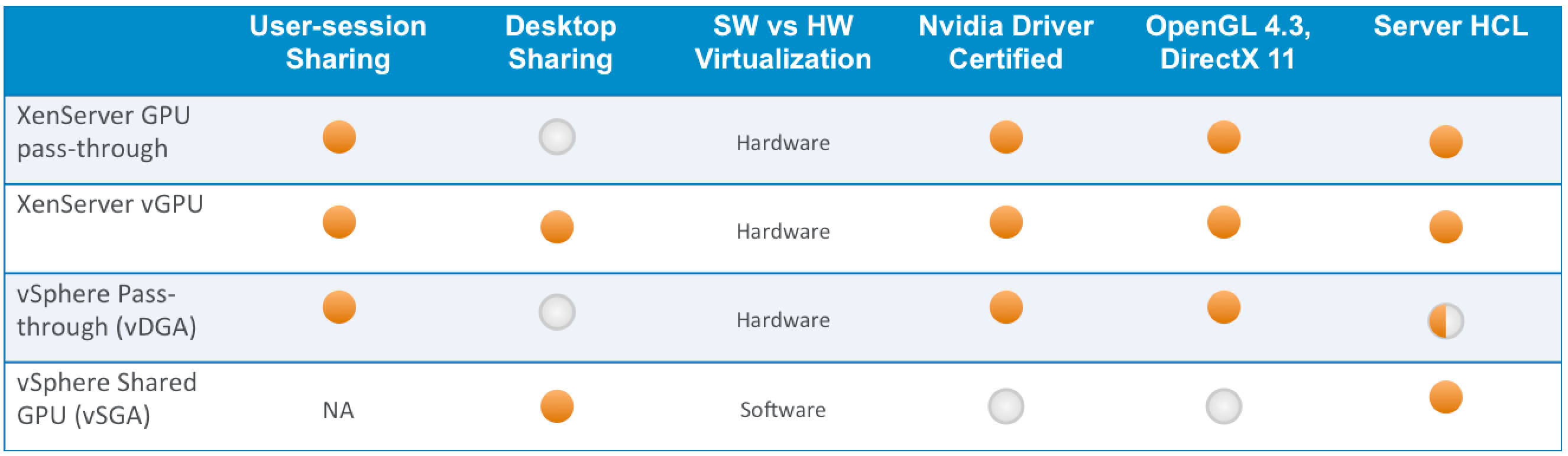
HDX 3D Comparison (GPU pass-through vs vGPU, sVGA, dVGA)

The table above summarizes at a high-level, the key differences between the XenServer and vSphere technologies.

HDX-3D-Comparison


Reviewers Guide for Delivering 3D Graphics

A 4-part series of easy to follow, step-by-step instructions that guide you to building a 3D enabled virtual app infrastructure using Nvidia GRID cards, compatible servers, XenServer and/or vSphere, with HDX 3D Pro feature in XenDesktop 7.

Reviewer’s Guide for Delivering 3D Graphics Apps: Part 1

Part 1 discusses the physical installation of Nvidia GRID GPU cards in compatible hardware, and enabling GPU pass-through in XenServer. Refer the guide for links to other parts in the series.

Reviewer’s Guide for Delivering 3D Graphics Apps: Part 2

Part 2 discusses the GPU pass-through feature in VMware vSphere, called vDGA. This allows XenDesktop 7 Apps to share a single GPU on vSphere platform, when running Windows Server RDS workloads. Refer the guide for links to other parts in the series.

Reviewer’s Guide for Delivering 3D Graphics Apps: Part 3

This is a placeholder for the vGPU guide on XenServer. It will be activated at the time of launching Tech Preview later this month. Refer article 12010 for the first part in the series

Reviewer’s Guide for Delivering 3D Graphics Apps: Part 4

Part 4 describes the steps to enable software-based GPU sharing in VMware vSphere, called vSGA. This allows graphics apps running on multiple Windows desktops to share a single GPU on vSphere platform, delivered using XenDesktop 7. Refer the guide for links to other parts in the series.

Source

Download Reviewer’s Guide for Delivering 3D Graphics Apps: Configure GPU pass-through Part 1 here

Download Reviewer’s Guide for Delivering 3D Graphics Apps: Configure vDGA – Part 2 here

Download Reviewer’s Guide for Delivering 3D Graphics Apps: Configure vGPU – Part 3 (Available in end of September 2013)

Download Reviewer’s Guide for Delivering 3D Graphics Apps: Configure sVGA – Part 4 here

Read the full blog from Mayunk at Citrix blogs

get ready for tech preview of NVIDIA GRID vGPU to XenServer and Citrix XenDesktop 7 VDI

At Citrix Synergy in May 2013, I was so excited to see CEO of Citrix & NVIDIA showing, how people can virtualize high performance graphical intense applications with Citrix XenDesktop 7 HDX 3D Pro, XenServer with vGPU support and NVIDIA GRID K2.

vGPU isn’t released yet, but  it’s soon time for true hardware virtualization of the GPU. NVIDIA GRID GPU’s are the “only” GPU’s available on the marked, thats build for cloud computing. What I mean with build for cloud computing, is that the GPU’s have multiple GPU’s build onboard and soon a software component “vGPU” from NVIDIA will be released to XenServer, which enables hardware virtualization of the GPU and reduce the cost and density for high performance workloads. Each virtual machine gets its own reserved GPU ressources of the GPU, before it was a 2:1 with the K2 soon its 8:1 maybe more.. time will tell 😉

If you got a NVIDIA GRID K1 or K2 running in your environment and you would like to virtualize the GPU and get access to the vGPU, please follow next step:
Advice: You need a XenServer as your chosen Hypervisor, vSphere and Hyper-V is not supported with vGPU.

How do you get access to the vGPU:

  1. XenDesktop 7 deployed with XenServer 6.2.  Both of these pieces you can obtain today, and on September 27th Citrix will release a tech preview add-on pack with the technologies to fully enable vGPU access for Windows desktop VDI workloads, extending our high performance GPU sharing capabilities beyond Windows Server RDS workloads.  When you look at the combined solution you’ll find there are some immediate benefits.  The most notable is that with the combined solution applications interact directly with NVIDIA drivers, not hypervisor drivers.  This means greater application compatibility, and greater performance with large 3D models.  Plus it doesn’t hurt that we’re able to natively support the latest versions of both DirectX and OpenGL out of the box. This will be true hardware vGPU with professional graphics performance benefits differentiating it from software vGPU and API intercept technologies such as Remote FX and vSGA which address less demanding 3D use cases like Aero effects and PowerPoint slide transitions
  2. Servers capable of running the NVIDIA GRID K1 or K2 cards. We’ve been working with the major hardware vendors and NVIDIA to bring a new generation of servers optimised for these technologies to market, multi-slot servers capable of supporting NVIDIAs best GPUs . Only a year ago Boeing’s engineers were dedicating a single server to a one user, today the possibilities got a whole lot wider.  Here are some server options to start with, and others do exist.

These new servers will support up to 12 GPUs, and with multiple users sharing each GPU, we expect these servers to support tens if not hundreds of users. Bringing the cost of ownership of a GPU enabled desktop within the range of entirely new markets and applications

Using XenServer vGPU capabilities, applications interact with an NVIDIA driver directly, not a XenServer one.  That means application vendors don’t need to recertify their applications to run with both NVIDIA and Citrix display adapters to leverage the power of XenDesktop 7 with high performance graphics.  Once certified with an NVIDIA driver, users can have every confidence that their applications will also work when accessed remotely via XenDesktop

Source