The long waited Citrix Branch Repeater 6.0 is out for download. Here is whats new in this release.
Release 6.0 is a major software release for the Citrix Branch Repeater. This release contains a number of new features along with bug fixes.
Release 6.0 is the first production release of the Branch Repeater 6.x software, which introduces traffic shaping, enhanced reporting, improved Windows Filesystem and Outlook/Exchange acceleration, and many other features.
Release Highlights
This major release of Repeater and Branch includes a significant number of new features, including:
- Smart Acceleration
Now traffic can be prioritized based on a variety of different parameters including service class, protocol, QoS parameters, IP address or range, port, etc. Applications are automatically detected and QoS features can be applied to all traffic including unaccelerated protocols like UDP.
- Extensive Reporting on WAN Bandwidth Utilization
Repeater administrators will have a vastly improved view into WAN operations and bandwidth utilization with several new dashboards and graphs.
- ICA Prioritization based on Desktop Group or Published Apps
XenDesktop and XenApp administrators can prioritize traffic on a WAN link based on an individual’s desktop group or a specific XenApp published application.
- Over 500 Pre-Defined Service Classes
Repeater and Branch Repeater 6.0 includes and automatically detects over 500 pre-defined applications on the WAN. Priorities can be assigned to the pre-defined service classes so unintended traffic like games can be given very low priority or blocked.
- And Many More Features
Support for new features in the next releases of XenDesktop and XenApp, new printing acceleration enhancements, SMB2 and encrypted MAPI acceleration, acceleration for Outlook and Exchange 2010 and support for the Citrix License Server.
New Features in Release 6.0
- Traffic shaping which expedites WAN traffic according to user-selectable policies. Both accelerated and non-accelerated traffic are shaped to give full control over the link. Traffic shaping replaces the “Repeater QoS” feature.
- Traffic classification and reporting give greater visibility into WAN traffic. • Multi-stream ICA support provides a better user experience for XenApp and XenDesktop by combining acceleration with enhanced traffic shaping.
- Vista/Windows 7/Windows Server 2008 Filesystem acceleration. New SMB2 accel- eration features increase remote filesystem performance.
- Windows filesystem acceleration. Signed SMB can now be accelerated.
- Enhanced MAPI Acceleration. Encrypted connections between Outlook and Exchange Server can now be accelerated.
- Support for multiple links. In previous releases, Branch Repeater had a single-link model. Release 6.0 supports up to ten independent links, each with its own link speed, so traffic can be shaped precisely on every link.
- Remote license server support. Release 6.0 allows a remote network license server to supply the Branch Repeater licenses, simplifying deployment.
- Dashboard page provides a quick view of current system status.
- “Features” page. The product’s enable/disable toggles have been combined on a single page.
- Simplified menu structure. The number of top-level menu categories has been reduced. Entries within a category are now alphabetized. Similar functions have been combined into a single page, such as “Advanced Deployments,” which con- tains the functionality of the old high-availability, WCCP, group-mode, and proxy-mode pages.
Compatibility
Note: The Repeater Plug-in is not included with release 6.0 Plug-ins from prior releases will interoperate with Appliances running release 6.0
Note: Branch Repeater with Windows Server is not included in release 6.0 Branch Repeater with Windows Server Appliances from prior releases will interoperate with Appliances running release 6.0
Supported Products
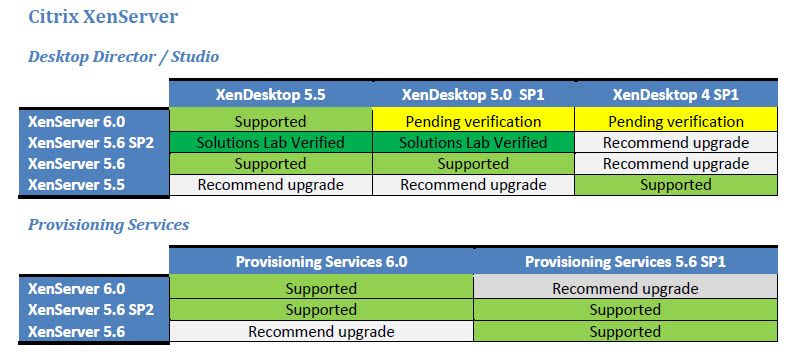
Bellowed figure shows supported products and platforms for Citrix Branch Repeater

Supported Branch Repeater VPX Configurations
Release 6.0 is supported on Branch Repeater VPX running on both XenServer (5.5 and 5.6, but not 5.6 FP1) and VMware vSphere ESX/ESXi 4.1 hypervisors.
Note: The User’s Guide incorrectly states that VMware vSphere ESX 4.0 is supported. The correct list is “ESX 4.1 and ESXi 4.1.”
Note: The User’s Guide incorrectly states that the “Enable Bridging” feature is on the “System Status” page, when it is on the “Features” page.
RAM and vCPU requirements have increased with this release. See Figure 2 and Figure 3.

Licensing
Release 6.0 supports both remote license servers and locally installed licenses. If you are upgrading an existing system with a local license, it will continue to work.
Branch Repeater VPX supports two license types: remote and local licenses
- Production licenses use remote licenses hosted on a Citrix license server. Production licenses include retail, CSP, and annual licenses
- Non-production licenses (such as VPX Express and Eval licenses) are installed locally on the Branch Repeater VPX virtual appliance
- Annual and CSP licenses need to be installed on your license server
Sources (require MyCitrix ID)
Download Release notes for Citrix Branch Repeater 6.0 here
Download Quick Installation Guide for Citrix Branch Repeater 6.0 here
Download User Guide for Citrix Branch Repeater 6.0 here
Download Branch Repeater VPX for Citrix XenServer and VMware vSphere Software Release 6.0 here
Download Citrix Branch Repeater Appliance Software Release 6.0 here