VDI Smackdown v 2.0 available

Ruben Spruijt (CTP, MVP, vExpert) have updated the awesome whitepaper “VDI Smackdown” to version 2.0. I highly recommend to read this whitepaper if you have VDI or are looking at getting VDI. This is a great comparison.

About VDI Smackdown v.2.0 whitepaper

The latest solutions included in the feature matrix are: Citrix XenDesktop 5.6FP1, Citrix VDI-in-a-Box 5.2, Dell vWorkspace 7.6, Microsoft RDVH Windows8/Server 2012 and VMware View 5.2; The English whitepaper can be downloaded here. The Japanese version will be available as soon as possible.

Empowering the end-user by giving access to Windows, Web and Mobile applications so he can access data and information systems from both private and public datacenters regardless of the device or location is the ultimate strategic objective.
The delivery of the classic (Windows) desktop interface can be divided in two segments:

  • the classic desktop and laptop, running Windows, Linux or Mac OS X;
  • the virtual desktop running in the datacenter or local on the classic workstation.

In essence “desktop virtualization” is the de-coupling of the desktop, operating system and the applications from the underlying endpoint or device. This kind of virtualization can be subdivided into two types:

  • With the first type applications are executed remotely, server hosted, and presented at the endpoint via a remote display protocol.
  • With the second type applications are executed at the endpoint, client-side and presented locally.

Making Windows, Web and Mobile applications available to the end-user, regardless of the technology being used, is an important strategic objective of an advanced IT infrastructure. The Virtual Desktop (vDesktop) is an essential component in the range of Application and Desktop delivery solutions and in essence, it provides the following functions:

  • Flexibility: Detach the vDesktop from the endpoint; Several vDesktops can be used next to one another
  • BYO: enables delivery of applications and desktops for BYO scenario’s;
  • Access: vDesktop works independently of location, endpoint and network;
  • Security: Server Hosted – VDI; data in the computing center;
  • Freedom: Every user can have his own desktop with administrator privileges when needed;
  • Management: Centrally managed and hardware independent;
  • Legacy: It is simple to offer legacy applications on a state-of-the-art platform;
  • Sustainability: Power Management, handling the necessary resources in an efficient manner

The transition to a dynamic and optimized desktop is causing many IT organizations to reevaluate traditional IT operations, deployment, delivery, packaging, support, and management methods.
Desktop virtualization is a key component in the optimized desktop. It’s important to have a Vision and Strategy around application and desktop delivery and enterprise mobility. Designing, building, managing and maintaining the desktop virtualization infrastructure using the right Technologies, corresponding vendors and products is an important step. We see a lot organizations primarily focusing on products and vendors and lacking a clear and profound vision and strategy. This approach is fine for a point solutions but a proper vision and strategy is crucial for a vNext optimized desktop. How can the vision and strategy be successful? Success = Vision x Execution x Adoption!

The following discussions and corresponding topics should be part of the optimized desktop strategy:

  • What are the use-cases? Does the use-case require Desktop Virtualization?
  • VD-why, what do you want to achieve, a business enabler, overall cost of ownership (TCO) and cost reducer?
  • What is the business-case? What do you expect as a ROI?
  • How do you deliver applications to users in a Bring Your Own (BYO) or Choose Your Own (CYO) scenario?
  • What’s your desktop delivery and migration strategy for Windows 7/Windows 8?
  • What’s the user experience using Multimedia, Video/Voice, 2D/3D applications?
  • Is Unified Communications and VoIP functionality within VDI needed? Is it supported by the VDI and UC-vendor?
  • What are the user expectations of the vDesktop? Are users involved in a proof of concept and pilot? What are their acceptation criteria?
  • What endpoints do we support and facilitate and what is the role of these devices in the end-user experience? Are the endpoints managed by the IT organization?
  • Do you want to deliver windows and web applications to mobile devices such as tablets and smartphones via VDI? What does the user wants? What is your enterprise mobility strategy?
  • What is the impact of Secure Access and Secure Networking solutions on mobile devices while connecting to the vDesktop? What is the user experience with these secure access solutions?
  • Is there a supported agent for the OS/endpoint? What is the User Experience with this agent? What is the feature and future roadmap of these agents? Is agentless via HTML(5) included and important?
  • Is image deployment and management part of the (virtual) Desktop Strategy?
  • How do you design and build the user’s profile and his ‘workspace’? Does Application virtualizationfit into this strategy? The ‘User Environment Management’ Smackdown can be helpful.
  • Do we need a vMachine based image management solution? How do we design, build and maintain the (golden) Image(s)?
  • Do you need context awareness? Based on user/role, device, location and various settings is access to application resources controlled and enforced when needed?
  • What is your application readiness assessment strategy? Are Windows 7, Windows 8, VDI, application virtualization and x64 included?
  • How are Windows applications delivered within the vDesktop? Unattended or manual installation, application virtualization or the applications are part of the (golden) image? What is the strategy?
  • Does the end-user needs the ability to install and update applications? Is User Installed Applicationsfunctionality needed? Does the user have the correct privileges to install or update software?
  • Do you need local or centralized storage? What storage optimization (IOPS/latency) technology is being used?
  • What is the VDI impact on storage and how does it affect the business case?
  • Do we focus on stateless (non-persistent) and/or stateful (hybrid/persistent) images? What is, for example, the impact on storage, manageability, security, legal and business-case?
  • Windows 8 or Windows 7 as core guest OS platform? x64 or x86?
  • How does the solution scale? What do we need from a scalability point of view? Is there a validated design?
  • What is the performance and bandwidth impact on the network infrastructure; LAN, WAN, WLAN, Mobile;
  • Licensing; VDI solution, guest and client operating system, Client Access Licenses and (Business) Applications.
  • Is Antivirus needed? Inside the VM or as layer on the Hypervisor? What is the real performance impactof Antivirus?
  • Is the VDI solution as a whole highly available? Is that built-in or are additional planning and solutions needed to get high availability? Is a highly available vDesktop needed?
  • Is the IT department able to adopt the technology with right knowledge and skills? What subject matter experts are needed to get and keep the VDI solution up and running in production environment? Is this expertise available? Who has overview of the complete VDI solution stack?
  • How does the desktop virtualization solution fit into existing deployment and management tools?

Bottom Line: What’s your current Enterprise Mobility and Desktop Delivery strategy?! 

Get a head start! Download our complete, in-depth, and independent whitepaper. We try to provide accurate, clear, complete and usable information. We appreciate your feedback. If you have any comments, corrections or suggestions for improvements of this document we want to hear from you! Feedback!? rsp@pqr.nl or twitter

Source

Article at BrianMadden.com

Download VDI Smackdown v.2.0 here

Citrix Tech Talk: Virtual Desktops for Designers and Engineers

Hi I am pretty excited about this. The week i am presenting at  NVIDIA GTC conference in San Jose (22 March 2013). I will Thursday 23 March 20113 do a webinar together with Citrix about how your company can successfully deliver 2D/3D applications on Citrix technologies.

This is my first official Tech Talk webinar together with Citrix with the topic:

Tech Talk – Virtual Desktops for Designers and Engineers.

The webinar will be held 21 March 2013 3PM – 4PM GTM

Whats the Citrix Tech Talk webinar about:

For desktop virtualisation to be successful for demanding users such as design engineers then, high-performance and rich image quality under low bandwidth, high latency network conditions are crucial. Citrix addresses these needs with a full range of solutions to deliver 3D graphics while optimizing costs – with options for both the high-end 3D graphics workloads and for lighter 3D and 2D tasks.

Help your business fully utilise offshore, mobile and remote employees for design engineering while maintaining secure control over intellectual property with desktop virtualisation.

42529832781267980 (1)

Join Yvonne Dresser, Senior Product Marketing Manager for XenDesktop at Citrix, and Thomas Poppelgaard, Product Manager/Solution Architect at Commaxx, in this technical webinar to learn how to:

• Deliver 3D professional graphics applications and workstations globally over low bandwidth, high latency WANs with a very usable application experience.
• Support multiple power users per workstation for improved cost efficiency and productivity.
• Enable mobile remote access to 3D graphics apps from mobile devices such as tablets and laptops

Sign up to the webinar here

I’m presenting at NVIDIA GTC 2013

Hi all

I have a very cool announcement.

NVIDIA have invited me to come at their yearly GPU conference the NVIDIA GTC (GPU technology conference) that will be held in March 18-23 2013, San Jose California.

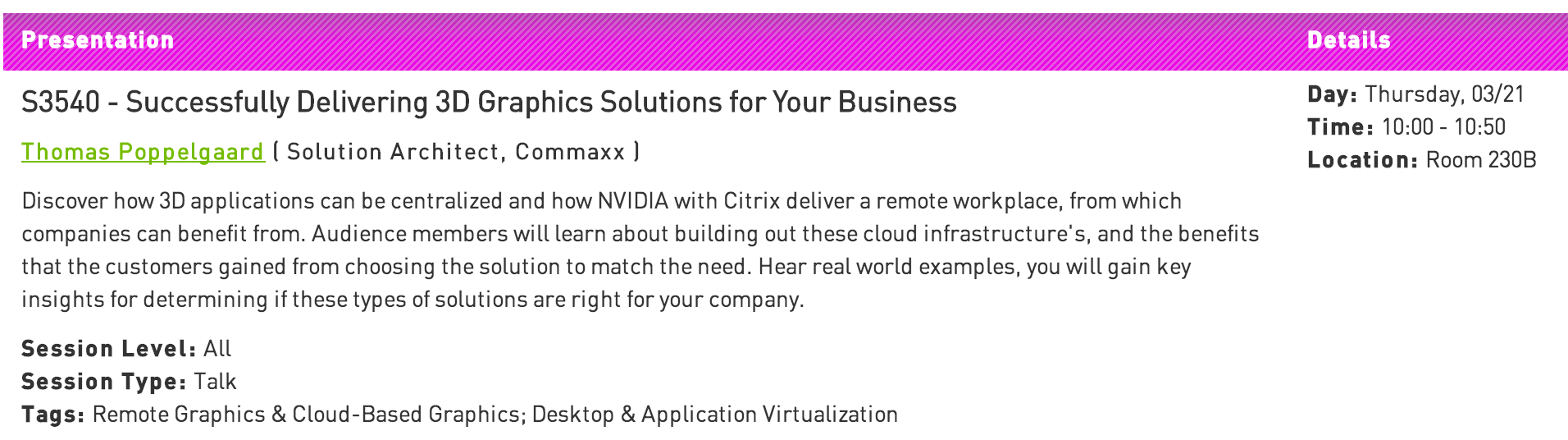
My session is called S3540 – Successfully Delivering 3D Graphics Solutions for Your Business

The audience will discover how 3D applications can be centralized and how NVIDIA with Citrix deliver a remote workplace, from which companies can benefit from. Audience members will learn about building out these cloud infrastructure’s, and the benefits that the customers gained from choosing the solution to match the need. Hear real world examples, you will gain key insights for determining if these types of solutions are right for your company.

gtc1

NVIDIA GTC

Are you going to NVIDIA GTC, and have the need for centralising your 2D/3D applications then come join my session its going to be energetic.

Other reasons why to join.
Hear technology experts like, Brian Madden. Derek Thorsland, Director of Product Management, Citrix. Phil Montgomery, Sr Director of Marketing at VMware. Will Wade, Director GRID Products at NVIDIA.

Check some of the technology experts that comes here

Why Attend, look here

Citrix Virtual Desktop Handbook 5.x

Citrix Worldwide Consulting services have released this great Citrix Virtual Desktop Handbook 5.x

Introduction

If you read industry magazines, you would think desktop virtualization is an impossible technology to deploy. So why do it? The simple answer is that Desktop Virtualization is designed to make your work life more flexible and mobile. A flexible work life can mean different things to different people: any device, any place, and any time. The “any-ness” of the work life means that a user becomes mobile. They can work on any endpoint device, can work from any location, and can work at any time they choose as long as they get their work done. Desktop virtualization provides flexibility without complicating the user’s life or putting corporate data at risk.

Take the following response from a desktop virtualization user:

Experiences from the Field

As a remote employee for [company], I struggled every time I needed to access the company’s intranet, which forced me to VPN into the network. I also kept data on my local device because trying to access it over my broadband connection was too slow. Some coworkers did the same and lost data due to a virus, thankfully I was luckier. 

Depending on my mood (and the weather), changing devices and locations was a challenge as I had to have my applications and data copied to many different endpoints. I know this was unsecure, but I didn’t care because I was more concerned with flexibility. 

Since moving to a virtual desktop, I’m able to use any device. I’m able to work from any location. And best of all, I don’t have to worry about copying my data and applications onto all of my personal devices. I paid for these devices; I don’t want work to clutter up my personal space.

Unfortunately, many organizations struggle or fail to achieve this level of success within their user community. Why does one organization succeeds while another organization struggles? If we compare the factors between success and failure between desktop virtualization and other technology related projects, we see that there is little difference:

  • Lack of justification: Without a solid business reason, desktop virtualization is simply a new way to deliver a desktop. A business justification gives the project team a goal to strive towards.
  • Lack of a methodology: Many people who try and struggle to deploy a desktop virtualization solution do so because they jump right in without understanding or implementing the appropriate prerequisites. A structured methodology provides the path for the project.
  • Lack of confidence: For many who embark on a desktop virtualization project, there is a lack of experience, which creates a lack of confidence in the design. Architects begin to second guess themselves and the project stalls.

Our hope is that this handbook can alleviate the anxiety associated with a desktop virtualization design by showing how to tackle the challenges in a manner that is technically sound, but also feasible and effective for organizations facing deadlines and other organizational challenges. The Citrix Virtual Desktop Handbook examines the project lifecycle for a desktop virtualization project. The Handbook provides the methodology, experience and best practices needed to successfully design

Note: This is Phase 1 for the Citrix Virtual Desktop Handbook focusing on Assess. Phase 2 and beyond  will provide design, deploy and maintain guidance. 

Sounds cool 😉 so go get the whitepaper under Source.

Source

Download Citrix Virtual Desktop Handbook 5.x here

Citrix Receiver 3.4 for Windows

Citrix have released a new Citrix Receiver 3.4 for Windows.

About Receiver 3.4 for Windows

Citrix Receiver for Windows provides users with self-service access to resources published on XenApp or XenDesktop servers. Receiver combines ease of deployment and use, and offers quick, secure access to hosted applications, desktops, and data. Receiver also provides on-demand access to Windows, Web, and Software as a Service (SaaS) applications. You can use it for Web access or configure it for use with Citrix CloudGateway.

What’s new

Citrix Receiver 3.4 for Windows (CitrixReceiver.exe) provides the following new features and enhancements.

  • Single authentication to the Access Gateway:
    • Use of a single session for both VPN and clientless access so that a Receiver user logs on once for both types of access and consumes only one license. This feature requires StoreFront.
    • Automatic routing of ICA traffic through the Access Gateway ICA proxy for optimal user experience.
    • Automatic start-up of a VPN tunnel when a user logs on. This feature requires that you disable the Single Sign-On with Windows setting on the Access Gateway.
    • Support for Access Gateway SmartAccess controls.
  • Improved logon and logoff operations:
    • Users are prompted to log on to Receiver only when a logon is required. Actions that require a log on include starting an app from Receiver or the Start menu, using the Refresh Apps command, viewing or searching for apps, or adding an account. A user is logged on only to the account associated with the requested resource.
    • Users remain logged on until choosing to log off or exit Receiver, roam from the internal network to an external network, or delete passwords.
    • A VPN tunnel is established when a remote user performs an action that results in a logon. Internal users are logged on to StoreFront.
  • Support for Windows 8. You can use Receiver for Windows 3.4 on Intel-based Windows 8 devices. (Receiver for Windows 8/RT is available on the Windows App Store for ARM-based Windows 8 devices.)
  • Support for Windows Server 2012 R2, 64-bit edition.
  • Support for Project Thor Technical Preview (XenApp Connector). Receiver for Windows 3.4 can be used with Project Thor Technical Preview to deliver apps with Microsoft System Center 2012 Configuration Manager.
  • Usability improvements, including:
    • App and desktop Start menu shortcuts are no longer copied to other devices, enabling users to control the location of shortcuts on each of their devices.
    • The Request button is removed. Users can now simply click to add an app and, if a request for permission to add the app is required, a dialog box appears.
    • Arrow keys can be used to navigate search results.
    • Users will experience fewer dialog boxes when adding and removing apps.
    • Error messages and certificate warnings are clearer.
    • Users can reset Receiver to factory defaults. For information of preventing user resets, see http://support.citrix.com/article/CTX135941 in the Citrix Knowledge Center.
  • Support for session pre-launch. The session pre-launch feature reduces launch times for applications delivered through Web Interface sites.
  • Support for ShareFile StorageZones. Receiver for Windows supports both ShareFile-managed cloud storage and on-premises StorageZones.
  • Upgraded FIPS support. Receiver for Windows 3.4 supports certificates with a minimum public key of 2,048-bit RSA and a SHA256 signature hash algorithm.

Receiver for Windows Enterprise

The Receiver 3.4 for Windows Enterprise package (CitrixReceiverEnterprise.exe) provides the following enhancements:

  • Support for smart card single sign-on for Windows 7 devices. When used with Web Interface, Receiver 3.4 for Windows Enterprise enables smart card pass-through authentication from Windows 7 devices.
  • Support for Fast Connect. Fast Connect provides the necessary technology for partners to rapidly authenticate users to Citrix sessions or desktops.

Source

Download Citrix Receiver 3.4 for Windows here

Download Citrix Receiver 3.4 Legacy PNA for Windows here