VMware officially supports vDGA (GPU Pass-through) in vSphere/View

At VMworld in Barcelona, October 15th 2013, Vmware officially now support vDGA in vSphere 5.5. vDGA is a graphics acceleration capability that is offered by VMware with NVIDIA GPUs and is enabled by Horizon View 5.3 for delivering high-end Workstation Class 3D Graphics for use cases where a discrete GPU is needed.

The vDGA graphics adapters are installed in the underlying vSphere host and are then assigned to virtual desktops using VMware DirectPath I/O. Assigning a discrete NVIDIA GPU to the virtual Machine dedicates the entire GPU to that desktop and enables for CUDA and OpenCL compute.

With vDGA officially supported you can also used with Citrix XenDesktop or other technologies that requires a dedicated GPU in a Virtual Machine.

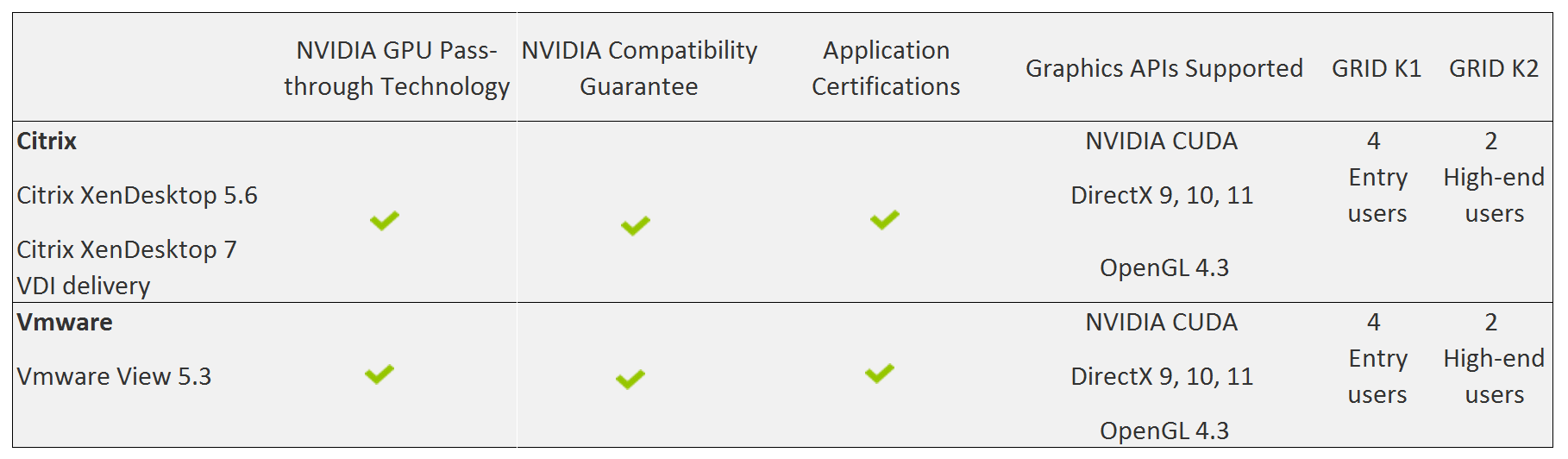
Bellow graphics shows how you now with either Vmware or Citrix can build a virtual desktop with GPU pass-through on either vSphere with View or vSphere with XenDesktop or XenServer with XenDesktop as a technology stack.

virtualization_of_GPU_vmware-citrix

GPU pass-through is now fully supported on View 5.3 and Citrix also have support for this in XenDesktop. Summary it means both Vmware and Citrix are now fully supported with GPU Passthrough with NVIDIA certification program, see below.

citrix_and_vmware_gpu_pass-through2

Source

NVIDIA

Reviewer’s Guides for HDX 3D Pro Graphics, on both XenServer and vSphere

Hi All

A good friend of mine from Citrix, Mayunk Jain & Pushpal have created these reviewers guide for Citrix XenDesktop 7 HDX 3D Pro.

The guides will help you how to either configure GPU pass-through on XenServer or VMware vSphere with Citrix XenDesktop 7 HDX 3D Pro.

He is using following hardware: Dell R720 with NVIDIA GRID K1 and K2, just like I have been using in many of the articles and videos I have shared to the community, and solutions I have build at customers.

In the first guide, they cover physical installation of GPU cards in a server, and how to enable GPU pass-through in XenServer 6.2. High-end graphics apps running on Windows Server VMs can share GPU among multiple user-sessions when delivered using XenDesktop 7 Apps or XenApp 6.5 FP2.

In part two, they see a similar use case on VMware vSphere platform. It describes the steps to enable GPU pass-through feature in vSphere 5.1, called virtual Dedicated Graphics Acceleration (vDGA). You learn how to set up XenDesktop 7 Apps and access 3D graphics using Citrix Receiver.

Part three walks through the steps to deliver virtualized access to a class of high performance graphics-intensive applications, which haven’t previously been considered virtualization friendly. Known as the vGPU feature in XenServer, this will be released as a tech preview later this month.

Part four looks at a different use-case on VMware vSphere, where the GPU is shared between several desktop VMs using software emulation. Called virtual Shared Graphics Acceleration (vSGA), this feature allows desktops published in XenDesktop 7 to deliver hardware-accelerated graphics apps on a vSphere platform.

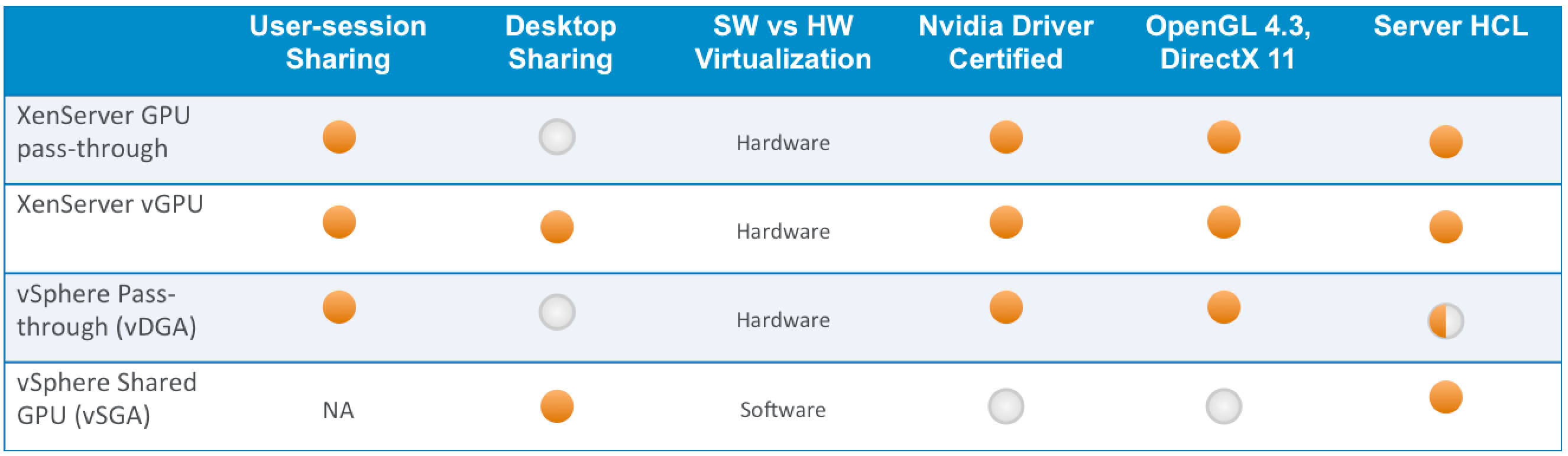
HDX 3D Comparison (GPU pass-through vs vGPU, sVGA, dVGA)

The table above summarizes at a high-level, the key differences between the XenServer and vSphere technologies.

HDX-3D-Comparison


Reviewers Guide for Delivering 3D Graphics

A 4-part series of easy to follow, step-by-step instructions that guide you to building a 3D enabled virtual app infrastructure using Nvidia GRID cards, compatible servers, XenServer and/or vSphere, with HDX 3D Pro feature in XenDesktop 7.

Reviewer’s Guide for Delivering 3D Graphics Apps: Part 1

Part 1 discusses the physical installation of Nvidia GRID GPU cards in compatible hardware, and enabling GPU pass-through in XenServer. Refer the guide for links to other parts in the series.

Reviewer’s Guide for Delivering 3D Graphics Apps: Part 2

Part 2 discusses the GPU pass-through feature in VMware vSphere, called vDGA. This allows XenDesktop 7 Apps to share a single GPU on vSphere platform, when running Windows Server RDS workloads. Refer the guide for links to other parts in the series.

Reviewer’s Guide for Delivering 3D Graphics Apps: Part 3

This is a placeholder for the vGPU guide on XenServer. It will be activated at the time of launching Tech Preview later this month. Refer article 12010 for the first part in the series

Reviewer’s Guide for Delivering 3D Graphics Apps: Part 4

Part 4 describes the steps to enable software-based GPU sharing in VMware vSphere, called vSGA. This allows graphics apps running on multiple Windows desktops to share a single GPU on vSphere platform, delivered using XenDesktop 7. Refer the guide for links to other parts in the series.

Source

Download Reviewer’s Guide for Delivering 3D Graphics Apps: Configure GPU pass-through Part 1 here

Download Reviewer’s Guide for Delivering 3D Graphics Apps: Configure vDGA – Part 2 here

Download Reviewer’s Guide for Delivering 3D Graphics Apps: Configure vGPU – Part 3 (Available in end of September 2013)

Download Reviewer’s Guide for Delivering 3D Graphics Apps: Configure sVGA – Part 4 here

Read the full blog from Mayunk at Citrix blogs

Login VSI 4.0

This is one of my favorite tools for benchmarking.

Login VSI have released a new version of their famous industrial benchmark tool Login VSI 4.0, a major new release of its flagship product Login VSI, the industry standard performance and scalability testing tool for Virtual Desktop Infrastructures and Server Based Computing environments.

VDI and SBC performance testing now easier and more realistic than ever with Login VSI 4.0

New Login VSI 4.0 dramatically improves ease of installation, test creation and test management, and offers unparalleled production level realism in workload patterns, datasets and test execution.

The design of this new version has been driven by extensive customer feedback programs, and production testing projects executed at multiple customer and vendor sites, including the tests done for the acclaimed independent research project Virtual Reality Check. Login VSI 4.0 makes testing of VDI and SBC environments easier and more realistic than ever before.

Improved ease of installation

The test image footprint of Login VSI has been reduced by almost 90%. This makes the tool not only easier to install, but also easier to integrate and deploy. Centralization of management, updates and logging makes the use of Login VSI more efficient than ever. Direct Desktop Launch (DDL) mode enables large-scale testing with minimal infrastructure.

Improved ease of test creation

The new intuitive and workflow oriented user interface of Login VSI 4.0 offers step-by-step test creation and wizard based test configuration for all important brokers and languages. The new workload editor introduces a new meta language which makes the customization of workloads very transparent and efficient. The new benchmarking mode enforces strict testing standards, providing industry standard results that are objective, comparable and repeatable.

01-login-vsi-40-management-console-home

Improved test realism

The duration of the standard workloads has been increased from 14 to 48 minutes loops. Also the way in which segments and applications start has been improved to better reflect real world user behaviour. The datasets used in the workloads now offer 1000 different documents per type, more and larger websites, and a video library in every format, all to ensure a real world variety in data usage. The execution of the workloads is improved through the introduction of phasing, allowing for real world production user scenarios.

11-login-vsi-40-workloads

Improved test insight

The new dashboard offers real-time test feedback, including progress, launched and active sessions, elapsed time and time left of the test in progress. The industry standard index VSImax has been further refined, enriching scalability results (max number of users), with objective baseline performance results (independent of tested load). Automated reporting with out of the box report ready graphs for all used settings, response times, and other data enhances the level, and choice, of information generated by the Login VSI analyzer.

12-login-vsi-40-analyzer-vsimax


17-login-vsi-40-analyzer-compare-wizard

“Login VSI is the industry standard for SBC and VDI testing and benchmarking, as is well demonstrated by the large number of technical papers that are available based on results from our benchmarking suite” says Eric-Jan van Leeuwen, CEO of Login VSI B.V. “The ease of use, and improved realism, of this new version of Login VSI will enable both vendor and end-user organizations to build and protect well performing virtual desktop environments”.

Login VSI 4.0 Pro is now available for all customers on active support and maintenance. Version 4.0 of the free Login VSI Express can be downloaded at www.loginvsi.com/download. More information about Login VSI and related services can be found at www.loginvsi.com.

About Login VSI

Login Virtual Session Indexer (Login VSI) is a vendor independent benchmarking tool to objectively test and measure the performance and scalability of Virtual Desktop Infrastructures and Server Based Computing environments by simulating unique user workloads. Leading IT-analysts recognize and recommend Login VSI as the de-facto industry standard benchmarking tool for VDI and SBC. Login VSI can be used to test VMware Horizon View, Citrix XenDesktop and XenApp, Microsoft Remote Desktop Services or any other Windows based hosted desktop solution. Login VSI is the standard tool used in all tests that are executed in the internationally acclaimed Project Virtual Reality Check. For more information visit www.loginvsi.com.

Source

Read more about LoginVSI here

Experts 2 Experts virtualization conference in Copenhagen 31th May – 2th June 2013

Hi All

I am proud to announce that I am speaking again at E2EVC (experts to experts virtualization conference) in 31th May – 2th June 2013.
This time it will be held in the beautiful Copenhagen in Denmark, so this is a good chance too meet some of the super geeks that works with Citrix, Microsoft or Vmware technologies. Alot of CTP (citrix technology professional), MVP (Microsoft value professional) VCP (Vmware certified professional) will attend and share their knowledge with the croud.

You can meet famous people like Carl Webster (CTP, MVP),  dr. Benny Trisch (CTP, MVP) , Wilco Van Bragt (CTP) and many many more.

e2evc_logo

Join us for the independent E2EVC Virtualization Conference in Copenhagen May 31-June 2, 2013 in Scandic Sydhavnen Hotel Copenhagen. The conference, which had 18 successful past events all over Europe, is 3 days – from Friday to Sunday and cover multiple Citrix, VMware, Microsoft and virtualization products from other vendors. It is a great opportunity to meet with the peers from virtualization industry and to share know how in a nice, relaxing atmosphere. More than 20 break-out sessions and 3 Master Classes await your participation. To have a glimpse at the Agenda click here. We look forward to meet you all in Copenhagen!

My session Saturday 1th June 2013 at E2EVC in Copenhagen:

Session – Which 3D remoting technologies are available today from VMware, Citrix and Microsoft

Short description:

  • Protocol advantages disadvantages
  • Hypervisors, what’s available and how do you configure this + advantages / disadvantages
  • Use cases from real world examples.
  • People will learn how it’s possible to centralize the apps that requires GPU and how they can deliver this
  • Hands experience on worlds first GPU that can be virtualized, how does it work with Citrix, Microsoft, Vmware

Visit www.e2evc.com/home for the conference agenda and registration information (special 1st May offer till 2013-05-03 only; more here).

Tech Talk: Virtual Desktops for Designers and Engineers

Hi all

I have had some amazing days at NVIDIA GTC 2013 where i did my presentation on how business adapt remote graphics solutions from Citrix.

citri

The same week I did a Tech Talk webinar together with Yvonne Dresser, Sr Marketing Product Manager at Citrix HQ in Santa Clara. The topic we discussed Virtualizing 3D Professional Graphics Apps and. In this webinar you will learn how Citrix XenDesktop & XenApp can deliver remote graphics with 3D applications and how they can be virtualized in multiple layers from Servers to Desktops to Apps and how they can be delivered to any device from a PC to a tablet, phone or even a thin client.You will learn which graphic solutions from NVIDIA thats available and how the new NVIDIA GRID K1/K2 fits into these solutions from Citrix.

I covered the best practice part from the field i have experience in the years since 2008 and share this with the audience and we got 30 questions that we cover, so for me it was amazing having such a big audience attending and asking for very technical questions how to build these solutions and what the requirements are, whats available whats possible.

Source

Watch the recorded webinar here

Download the presentation here PDF format

Download the presentation here PPS format