HPE Moonshot Reinvented

reinvented

HPE Moonshot have been around for some time now, and I have been very lucky working together with HPE and testing their server cartridges that are compatible with Citrix solutions. Last year, at HPE Discover in London, I wrote an article about how Citrix internally are using HPE moonshot and which server cartridges were available at that time and how financial customers are benefiting from these solutions.

Continue reading

Citrix XenDesktop 7.11 and XenApp 7.11

7-11-logo

Citrix have released a new version of Citrix XenDesktop 7.11 and XenApp 7.11 and is now available for download.

Citrix raises the bar of for user experience and new product release of following technologies

  • Virtual Delivery Agents 7.11 for ServerOS and ClientOS
  • AppDNA 7.11
  • Storefront 3.7
  • Provisioning Services 7.11
  • Profile Management 5.5
  • License Server 11.14
  • Citrix Receiver 15.0 for Windows
  • HDX RealTime Optimization Pack 2.1.1 for Microsoft Skype® for Busines
  • Citrix SCOM Management Bundle for XenApp and XenDesktop (2016_08_24)
  • Linux Virtual Delivery Agent 1.4
  • Tech preview for HTML5 redirection

This release is an important release no matter if you are working daily with Office application such as Excel, Word or Browsers and even highend applications such as CAD. The features in 7.11 have important improved user experience from the VDA to the Receiver that improves dramtically the user experience. NVIDIA NVENC technology is now part of VDA and supports even multiple monitors. The admin can now monitor RTT within Director this feature have been something I have asked for very long time and now finally its in the product, customer will love this new feature so its fast to see where the issue is in a infrastructure with which users that have latency issues. Version 7.11 is the release that fully supports Microsoft Windows Server 2016 that is soon GA, this means you can install Delivery components on Windows Server 2016, VDA on Server 2016, use Azure N-series with support for Windows Server 2016 Hyper-V Discrete Device Assignment (DDA) or you can use it onpremises with Hyper-V. Support for UWP is HUGE and I am very excited about this technology and this also used in Microsoft Hololens so cant wait to a Receiver for hololens so you can publish UWP apps to Hololens 😉 Imagine that. I can keep going on with all these new features lets dig in below and learn whats new, its incredible that Citrix raises the bar and comes with huge improvements and they this each 3 months 🙂 yes each 3months, you read it correct. If you dont have a plan for this in your company I highly recommend you build a strategy on how you upgrade you Citrix environment frequently to get these awesome new features.

Continue reading

Microsoft Hololens Commercial Edition

Hi All

I have been having the Microsoft Hololens developer edition for some weeks now and I am amazed how a great product it is, when I got unbox the package I could quickly see that this was not a typical “developer” product aka “beta” product it seem finish and ready for shipping for the masses.

IMG_9017

I created a video of how great Citrix is working together with Hololens, you can see it below

In the nearest future you will be able to run Published applications from Azure such as the new announced service Citrix XenApp “express” instead of the discontinued “Azure RemoteApp” – read more about this annoncement here

Below video gives you an idea how it might look like working on either a Word document or heavy GPU CAD application such as Autodesk AutoCAD from the Hololens. The applications are not installed on the Microsoft Hololens, they are running from servers securely and pixels are only streamed to the Microsoft Hololens, this is what is called remote graphics, and now possible in Augmented Reality. Powerful technology and many use cases for this new workstyle.


Today Microsoft is now shipping the Hololens Commercial edition.

https://www.youtube.com/watch?v=uWS3C95aehQ


The Commercial Suite includes the Development Edition, enterprise features for added security and device management, and a warranty. Transform your business with Microsoft HoloLens.

Contact your Microsoft account representative or email mpcsales@microsoft.com.

hololens

Unboxing Microsoft HoloLens Development Edition

IMG_8904

IMG_8905IMG_8906IMG_8907

What’s in the box

  • Microsoft HoloLens Development Edition
  • Clicker
  • Carrying case
  • Microfiber cloth
  • Charger
  • Micro-USB 2.0 cable

Enterprise features

  • Kiosk mode. With HoloLens kiosk mode, you can limit which apps to run to enable demo or showcase experiences.
  • Mobile Device Management (MDM) for HoloLens. Your IT department can manage multiple HoloLens devices simultaneously using solutions like Microsoft InTune. You will be able to manage settings, select apps to install and set security configurations tailored to your organization’s need.
  • Identity. Azure Active Directory and next generation credentials with PIN unlock.
  • Windows Update for Business. Controlled operating system updates to devices and support for long term servicing branch.
  • Data security. BitLocker data encryption and secure boot is enabled on HoloLens to provide the same level of security protection as any other Windows device.
  • Work access. Anyone in your organization can remotely connect to the corporate network through a virtual private network on a HoloLens. HoloLens can also access Wi-Fi networks that require credentials.
  • Windows Store for Business. Your IT department can also set up an enterprise private store, containing only your company’s apps for your specific HoloLens usage. Securely distribute your enterprise software to selected group of enterprise users.

Source

https://www.microsoft.com/microsoft-hololens/en-us/commercial-suite


NVIDIA GRID – AppGuide (AutoCAD)

Hi All.

I want to share this with you all, Luke Wignall and his team from NVIDIA have created some great AppGuides, that helps with understanding how many users can you put on a NVIDIA GRID system with either K1/K2 in a VMware environment. These guides are made together with vendors such as Autodesk. The guides focus on following apps Autodesk AutoCAD.

In this blogpost my goal is to highlight the great work NVIDIA have done creating the scalability app guides and these guides helps you if you want to virtualize Autodesk AutoCAD 2015 with NVIDIA GRID and VMware Horizon. The guides are great – cause they give an idea what you would require in a virtualized environment and these can be reused for other virtualized platforms such as Citrix and Microsoft – keep in mind that results might be different. If you would like to get more informations about how the setup is configured and which methodology i recommend you read the AppGuide, you can download it in under source in the end of this article.

The appguides gives a great idea to understand the impact of CPU and how the GPU are giving value.

Autodesk-Logo-2013

AutoCAD_2016

About AutoCAD 2015

Autodesk AutoCAD is one of the most globally used software platforms for CAD design and documentation.  AutoCAD leverages both CPU and GPU to deliver a high quality user experience, and as a result, there are several things that need to be considered in architecting your GRID vGPU solution: the size of your map data, the concurrency of your users, and the level of interaction with primary 2D and some 3D data.

Results NVIDIA Appguide for Autodesk AutoCAD 2015

autodesk-nvidia-vmware

The following are results of our testing, looking for the greatest scalability while still within performance expectations.  It’s important to note that your users, your data, and your hardware will impact these results, and you may decide a different level of performance or scalability is required to meet your individual business needs. As the Catalyst benchmark does not push AutoCAD’s GPU capabilities, and was built to push the limits of dedicated hardware versus the shared resources of VDI, the decision was made to stop testing once the CPU was approaching 100% utilized and test times had climbed past twice what we were finding on the a single physical workstation with dedicated resources.  We then met with the Autodesk AutoCAD team, discussed the results, reviewed the tests in action, and physically verified that this was still within what a typical user would deem acceptable and usable. When running AutoCAD, anything higher than 20 FPS is awesome, but users generally don’t notice the difference once you exceed 30 FPS.  However, once you drop below 10 FPS, the software is going to feel very sluggish and become unusable by the time you hit 5 FPS. • 20 fps above is good • Below 10fps – sluggish • 5 fps – unusable

  • 32VM : K220Q perform better than K120Q but K120Q is still maintain avg 31FPS. 
  • 40VM : Due to vGPU configuration, need K120Q, avg FPS is 24 FPS
  • 48VM : one you hit 40 VM running, avg FPS is dropping below 10 FPS. 

AutoCAD requires significant CPU resources, so investing in higher CPU speeds and more cores will pay off on performance and scalability.  For medium to large models, K240Q performance might be better for a real use scenario. Since your own situation is different, you must test with your own models to ensure the most accurate results. The chart below shows a comparison between two different sets of VDI guests, one using the K2 and its K220Q profile, the other a K1 and its similarly sized frame buffer profile, the K120Q:

äutocad2015_scaling-01

Notice that as scale, the number of concurrent VM’s increases, there is an obvious drop in performance, and logs will show this is the CPU becoming 100% utilized.  This is a “peak workload” test as all sessions are started in unison, we would expect humans to be more staggered in their workflow.

The next chart shows results when we add that synthetic human behavior, we delay the launching of each session by 5 seconds, this offsets the tests and prevents all tests hitting the same function and impacting the CPU in unison.

äutocad2015_scaling-02
Notice that with delayed launching, or staggered starts, the performance remains high to a much greater scale of concurrent sessions.

Additional findings from this testing:
• vCPU –  2 vCPU are sufficient for this benchmark, however increasing model size and complexity will change this. 
• Virtual System Memory – 2 GB is sufficient for this benchmark, however increasing model size and complexity will change this.  
• K220Q/K120Q  : both show capped FPS caused by frame rate limiting (FRL) 
• vGPU has 45 fps frame limiter for performance balancing across multiple VM

AutoCAD 2015 Users per server

Based on the NVIDIA GRID™ Performance Engineering Lab (GRID P.E.L.) findings, NVIDIA GRID provides the following performance and scalability metrics for Autodesk AutoCAD 2015. These metrics are based on tests with the lab equipment shown in the graphic below, using the Cadalyst benchmark, and in working with Autodesk and their emphasis on end user usability.  Of course, your usage will depend on your models and equipment, so this Application Guide is intended to be used as a starting point for your implementation.

autocad-users-per-server


Source

Download the NVIDIA GRID vGPU APPLICATION GUIDE FOR AUTODESK AUTOCAD 2015 ON VMWARE HORIZON here


NVIDIA GRID – AppGuide (ArcGIS Pro)

Hi All.

I want to share this with you all, Luke Wignall and his team from NVIDIA have created some great AppGuides, that helps with understanding how many users can you put on a NVIDIA GRID system with a K2 in a VMware environment. These guides are made together with vendors such as ESRI. The guides focus on following apps ESRI ArcGIS Pro.

In this blogpost my goal is to highlight the great work NVIDIA have done creating the scalability app guides and these guides helps you if you want to virtualize ESRI Pro with NVIDIA GRID and VMware Horizon. The guides are great – cause they give an idea what you would require in a virtualized environment and these can be reused for other virtualized platforms such as Citrix and Microsoft – keep in mind that results might be different. If you would like to get more informations about how the setup is configured and which methodology i recommend you read the AppGuide, you can download it in under source in the end of this article.

The appguides gives a great idea to understand the impact of CPU and how the GPU are giving value.

esri

arcgis

About ESRI ArcGIS Pro

ESRI ArcGIS Pro 1.0 is a  Geographic Information Systems (GIS) application for mapping, visualizing, editing, and analyzing spatial data.  Esri recommends a GPU for best end user experience, but as ArcGIS Pro 1.0 also generates heavy CPU load, this also needs to be considered in architecting your vGPU solution.  The size of your map data, the concurrency of your users, and the level of interaction with 3D data all need to be considered when defining your user groups.

Results NVIDIA Appguide for ESRI ArcGis Pro

esri-nvidia-vmware

The following are the full results of our testing.  The baseline was the 45 second draw time sum – anything greater than that value represented a worsening UX while less would be a better UX.  Looking for both performance and scalability, we tested looking for the greatest number of virtual desktops, and therefore the greatest scalability, while still within performance expectations and the threshold of 45 seconds.  It’s important to note that your users, your data, and your hardware will impact these results and you may decide a different level of performance or scalability is required to meet your individual business needs.   Tests were also run to look for potential NUMA issues that can negatively impact performance.  This is where the physical GPU and its PCI-e channels are tied to one physical CPU, while the virtual desktop is running on the other physical CPU, so communication with the physical GPU has to move over the QPI between the two physical CPUs.  This creates a bottleneck and can cause performance issues.  However, in our testing, the application is sufficiently CPU bound that NUMA affinity made little difference. The results in the table below show the decrease in performance as we increased vCPU counts, and then the increase in scalability with synthetic human behavior (think time):

esri-arcgis-users-pr-server-2

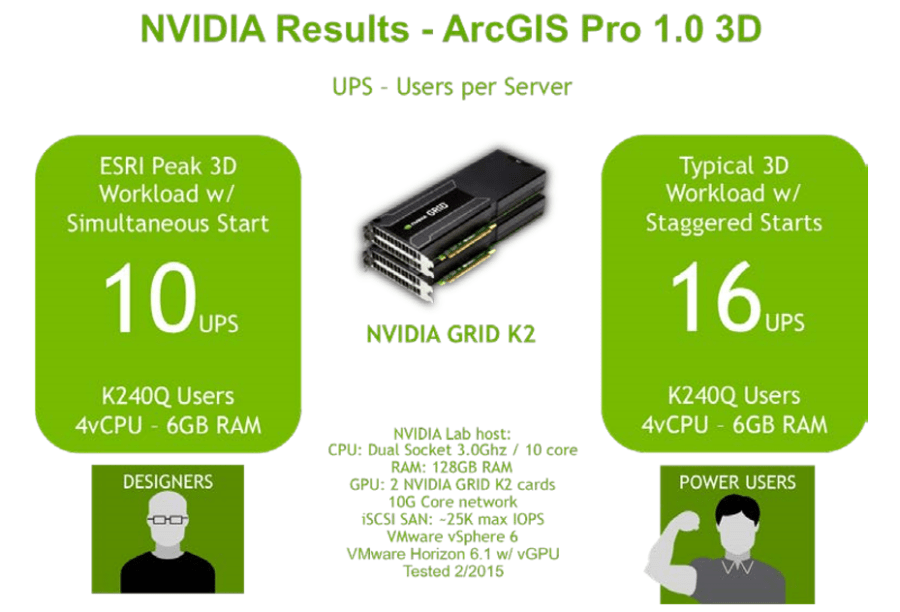
ArcGIS – users per server

Based on NVIDIA Performance Engineering Lab findings, NVIDIA GRID provides the following performance and scalability metrics for Esri ArcGIS 3D Pro 1.0. These metrics are based on tests with the lab equipment shown in the graphic below, using the Esri API based “heavy 3D” benchmark and in working with Esri to determine acceptable performance.  Of course, your usage will depend on your models, but this is guidance to help guide your implementation.

esri-arcgis-users-pr-server

Source

Download the NVIDIA GRID vGPU APPLICATION GUIDE FOR ESRI ARCGIS PRO 1.0 – 3D ON VMWARE HORIZON here